STEP 01
Select your frame
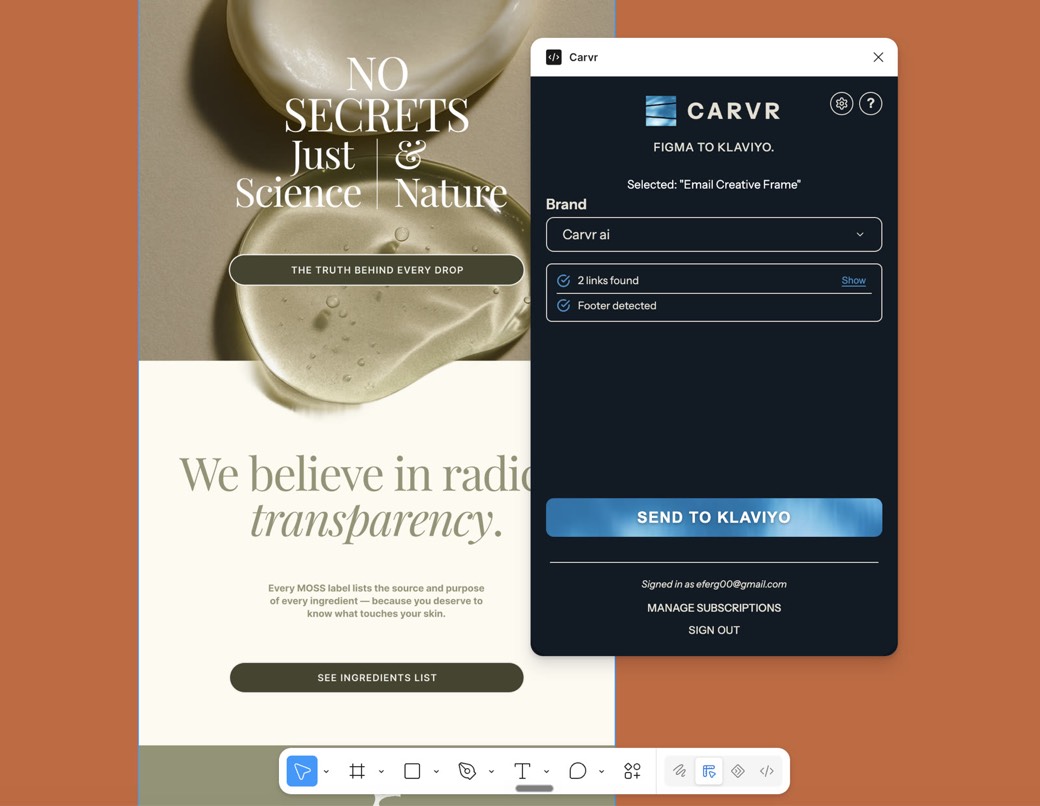
Open the Carvr plugin in Figma and click your email frame. Shift-select a few more to send a whole campaign in one go.
Select your email in Figma and click Send. Carvr handles the slicing, compression, links and alt text, and in about 30 seconds the template is in Klaviyo, ready to edit and send.
Set up in 30 seconds · Free plan, no card needed · Cancel anytime
 Klaviyo Tech Partner
 Omnisend
 Mailchimp
Agencies Trust Carvr
Email Designs Uploaded(live count)
Including








Built for agencies, marketers, designers & copywriters.
Open the Carvr plugin in Figma and click your email frame. Shift-select a few more to send a whole campaign in one go.
Carvr slices the design, compresses every image, maps your links and writes alt text, all in the background.
It lands as a drag-and-drop template with every block editable. GIFs keep moving, and text can stay live.
Drop a PNG or JPG from Photoshop, Illustrator or Canva into the Carvr web app. It slices the design, you fine-tune the cuts and links, then send it to Klaviyo, Mailchimp or Omnisend, or export it for any other ESP.

Push email designs straight from Figma into Klaviyo as a ready-to-send, drag-and-drop template in a single click. No exporting. No copy-paste. No HTML. Ever.
One email, built by hand and built with Carvr. Watch the clocks.
With Carvr
About 6.2 hours back per brand, every month, at average send volume.
How many brands do you manage?
How many emails does each brand send a month?
That's 160 emails a month, and about 65 hours saved.
No card required
Upgrade whenever you like
after your 14-day free trial
$0 today. Cancel anytime.
Most popular
after your 14-day free trial
$0 today. Cancel anytime.
after your 14-day free trial
$0 today. Cancel anytime.
after your 14-day free trial
$0 today. Cancel anytime.
Upgrade, downgrade, or pause anytime. No contracts. No hidden fees.
Want a walkthrough first? Book a demo
Hours saved assume 25 minutes of manual work per email, versus about 30 seconds with Carvr.
An email slicer cuts a finished email design into image sections and builds them back into a template. Carvr finds the cuts for you, at background changes and the gaps between sections, and sets a link and alt text for each one. You can move any cut in the web editor.
Yes. Carvr cuts your design into image sections at its exact size, so fonts, colors and layout arrive as you designed them, with nothing rebuilt in HTML. You can move any slice line in the web editor, before or after you send.
Yes. Each email lands in Klaviyo as a native drag-and-drop template, every section in order with its link and alt text set. Edit it like any other template: add text, variables or product blocks, and use it in campaigns and flows.
Klaviyo's plugin exports the frames you select as images into your Klaviyo image library, and you lay out the template yourself. Carvr finds the cuts and builds a native drag-and-drop template in Klaviyo, with links and alt text. It also sends to Omnisend and Mailchimp.
Klaviyo, Omnisend and Mailchimp. Connect as many brands as you like, each to one platform: Klaviyo in one click with your Klaviyo login, Omnisend and Mailchimp with an API key. Using something else? Download every section from the web editor and build the email there.
Yes. Connect the brand to Mailchimp with an API key, then send from the Figma plugin or the web app. Carvr slices the design and saves it to your Mailchimp templates, with a link and alt text on each section.
Yes. Export the whole email from Canva, Photoshop or Illustrator as one PNG or JPG, ideally 1200px wide, and upload it to the Carvr web app. Carvr slices it, you check the cuts and links, and it builds the template.
Yes. You connect through Klaviyo's own sign-in: pick the account and click Allow, with no API key to copy or share. Carvr only asks for access to account details, images and templates, and Disconnect removes that access at any time.
You pay per email, not per seat: every plan includes unlimited brands and teammates. Start free with 5 emails a month, or try any paid plan free for 14 days, from $48 a month for 30 emails. On paid plans, extra emails bill at your plan's rate, so you're never blocked.
Something else on your mind? Talk with our team.
Book a demo